
View/Download On Blender Extensions
OR use Preferences > Get Extensions
and search "OpenVAT"
OpenVAT is a Blender-native toolkit for baking Vertex Animation Textures (VATs) — enabling engines and DCCs to semalessly play back complex animated deformation as vertex offsets on GPU via low-cost vertex shaders. OpenVAT takes VATs a step further by leveraging animated modifier stacks, dynamic simulations and geometry-node-based animation workfows for real-time use.
I’m always looking for ways to enable artists and animators while helping real-time projects stay within performance budgets. OpenVAT exists because Vertex Animation Textures (VATs) offer a rare blend of flexibility and performance — letting you bake mesh deformation into textures that play back efficiently on the GPU, bypassing the need for complex rigs, runtime simulations, or heavy caches.
What sets OpenVAT apart from other VAT tools is that it’s fully Blender-native and captures deformation from Blender’s evaluated dependency graph. That means it supports any vertex-level animation — including Geometry Nodes, modifiers, shapekeys, simulations, or even third-party plugins like AnimAll. If it visually deforms in Blender, OpenVAT can record it.
OpenVAT enables animation workflows that are otherwise impossible to export — bringing procedural and simulated effects into game engines that would normally require complex in-engine setups or be outright unsupported by formats like FBX or Alembic.
VATs aren’t meant to replace traditional rigging or animation systems outright, but they shine in specific scenarios: when you need baked simulations running on low-spec hardware, massive instancing of animated assets, or stylized deformation that would be too expensive or fragile to run live.
OpenVAT makes that workflow visible, customizable, and optimized — no black boxes, no guesswork.
OpenVAT (the Blender extension) is licensed under the GNU General Public License v3.0 (GPL-3.0).
A large part of my mission with this tool is education and accessibility. You are free to use, modify, and distribute OpenVAT — including in commercial projects — as long as your project is also open source and licensed under a GPL-compatible license.
❌ You cannot integrate OpenVAT into proprietary or closed-source software without a separate commercial license.
Like any Blender render, OpenVAT output is free of license restriction and may be used commercially.
Provided shader templates for Engines are licensed under a more flexible MIT license, as to not unintentionally carry GPL requirements into production.
If you need to include OpenVAT in a closed-source toolchain, middleware, or product, please contact me to discuss alternative licensing options.
OpenVAT encodes mesh deformation into textures — storing per-vertex data over time that can be sampled in a shader. This isn’t just baked playback; it’s low-level mesh deformation with real-time control, driven entirely on the GPU.
The export side is simple: vertex data over time, frame by frame. But the power lies in how you use it. In the shader, VATs become a flexible tool for animation, instancing, reactive FX, or even modular motion logic — far beyond just playing back a cached mesh.
Because the data is stored per-vertex, you can drive deformations based on world-space proximity, time offsets, random per-instance values, texture masks, or gameplay triggers. VATs aren’t limited to “just play the animation” — they’re a raw format for sculpting motion at scale.
OpenVAT provides the data — what you do with it in the shader is up to you. It’s not a closed animation format. It’s a flexible, engine-ready foundation for real-time deformation.
While powerful, OpenVAT is designed for specific data conditions. To maintain accurate encoding and decoding, the following limitations apply:
To circumvent some of these limitations, specifically encoding fluids, point clouds and meshed volumes, I've been developing experimental methods for generative remeshing - which is planned to be released in a future version, when tested and optimized.
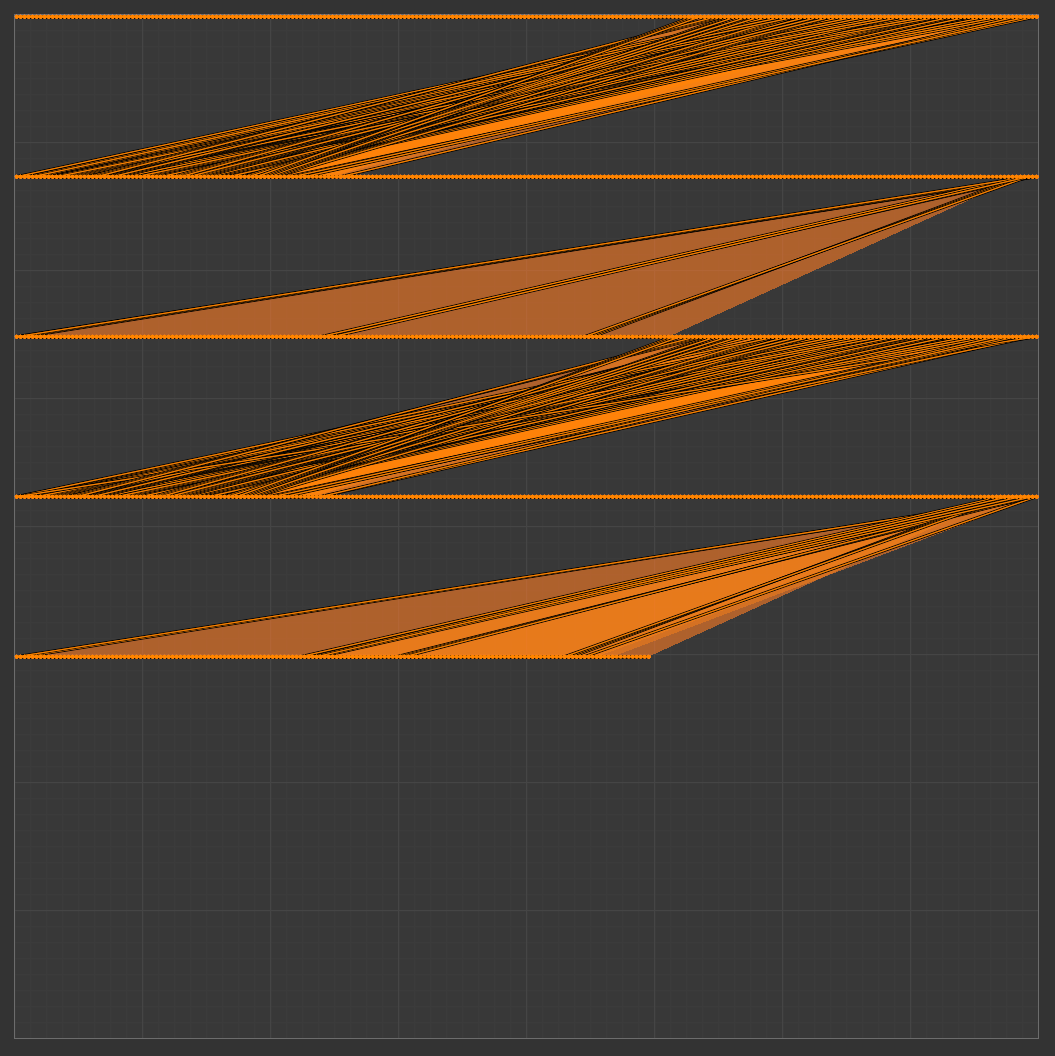
Before the automated encoding process starts, the final height and width of the final VAT need to be determined. This is done using vertex and frame count. I designed OpenVAT to vertically track time (reminicent of old-school vertical tracking DAWs). Each pixel across the X axis will represent a vertex, each pixel down the Y axis will represent 1 frame of time. At this time it is not possible to swap the time/vertex axis - Y is ways frames, X is always vertices.
A second UV Layer is created on the mesh which convents this determined pixel size into UV coordinates, and places each vertex on the center a specific pixel's future location. This UV layer is named VAT_UV and is created in addition to any current existing UV maps (throughout the documentation I may refer to this as UV1, assuming a standard layout on UV0). If your mesh does not have a UV0, preset engine decoders may not work as expected, because they assume a UV index, not string name.
Frequently, the number of frames and vertices will be wildly different, with almost all encoding resulting in more vertices than frames. For this reason, a wrapping method is used. Consider a mesh of 800 vertices is animated over 100 frames. With this method, this will result in a 512x512 - where the first 512 vertices are represented on the top row of the texture, and the remaining 288 vertices are 100 pixels lower (starting on pixel 101). This allows for the 100 frames to be read by simply translating each mapped vertex in -Y
Encoding details always is available before you encode except when the target is a collection. It also shows an estimated range of data when using automatic normal-safe edges. This is because it takes more practical computing to determine vertex count when this count is modified by hard edges that will be ripped upon encoding. See edge handling for more about why this happens.
In this method, the texture width w (a power of two) defines the maximum number of vertices that can be packed per row, but the actual number per row is min(w, V) unless the data wraps across multiple rows. When wrapping is needed, the number of rows R is ceil(V / w), and each frame is stacked vertically by R rows. Most rows contain exactly w vertices, except the last, which may be partially filled. Even when w exceeds V, padding may occur, and only a portion of the row holds real data. This ensures power-of-two dimensions while minimizing unused space and maintaining a roughly square layout. This shown calculation assumes the VAT is not packed
OpenVAT Standard engine shaders simply rely on the VAT_UV layer to promote flexibility and ease of understanding. Some engines may reorder vertices on FBX import. Some engines may not allow vertex index sampling via shader. And so, sampling a UV map creates a stable decoding method for many use cases.
$$ \begin{aligned} &\textbf{Inputs:} \\ &\quad V \in \mathbb{N} \quad \text{Number of vertices} \\ &\quad F \in \mathbb{N} \quad \text{Number of frames} \\[8pt] &\textbf{Step 1: Try powers-of-two widths} \\ &\quad \text{For } w \in \{64, 128, \dotsc, 8192\}: \\[2pt] &\quad\quad R = \left\lceil \frac{V}{w} \right\rceil \quad \text{(vertices per row)} \\ &\quad\quad h = \text{next power of 2} \left( F \cdot R \right) \\[8pt] &\textbf{Step 2: Check squareness constraint} \\ &\quad \text{If } |\log_2 w - \log_2 h| > 1: \text{ skip} \\[8pt] &\textbf{Step 3: Choose smallest area (} w \cdot h \text{)} \\[10pt] &\textbf{Result:} \quad (w,\ h,\ R) \end{aligned} $$
Sometimes, it is adventageous to simply map each vertex index in a single row on X. This results in an image which is width of vertex count, height of frame count. The Use Single Row option enforces this encoding method, and does not wrap vertices on Y. This does result in NPOT (non-power-of-two) textures in cases where vertex count and frame count are not exact POT numbers. This is usually safe to use in practice in engines that do not enforce resolution restriction, because uncompressed images do not benefit from POT advantages in mipmapping or compression algorithms.
Since they utilize UV sampling and not index-based image sampling, current engine shader examples are agnostic in decoding either wrapped or single-row encoded VATs.
OpenVAT normalizes vertex position attribute values into a 0–1 range per channel based on their temporal min/max distance from deformation basis across the entire animation. This ensures that each attribute fully utilizes the texture's bit depth, maximizing precision while maintaining compatibility with standard texture formats.
When sampling an offset from an established base position
rather than absolute object-sapce vertex positions. In almost all situations, using a proxy-offset method results in cleaner, more finely-sampled range of value that engines handle gracefully as per vertex world position offset (WPO)
To avoid sampling inconsistencies and engine compatibility, HDR range is typically not used in these output textures. If you require full data (not normalized to 0-1) - this is possible in OpenVAT 1.0.4. Set your image export format to EXR32, then an option will appear "Use Absolute Values" - this will encode the full, uncompressed image - including negative values and values greater than 1. Use with caution, only when extremely acurate data is needed and engine compatibility is verified.
Absolute value mode will result in Blender with a VAT which looks incorrect (v1.0.4) - because it still makes an assumption to remap values to range -- this is noted as an issue to resolve in future releases.
To understand color sampling for position, consider following example where a single triange consisting of 3 vertices (v0, v1, v2) over a period of 3 frames (1, 2, 3). For clarity, numbers here have been rounded to a single decimal. in practice, since this information is collected directly from the evaluated depsgraph, we get much higher precision. Note that values in B (Proxy Vertex Position) are constant through time (frames). This is always true in OpenVAT: the deformation proxy acts as static geometry to reference in location to another object.
Like vertex mapping, the following is done automatically by OpenVAT, but understanding the process can help when debugging outputs and creating shaders for use outside of Blender.
| v0 | v1 | v2 | |
|---|---|---|---|
| Frame 1 | (1.0, 1.0, 1.0) | (1.0, 1.0, 1.0) | (1.0, 1.0, 1.0) |
| Frame 2 | (0.0, -1.0, 0.0) | (0.0, -1.0, 0.0) | (0.0, -1.0, 0.0) |
| Frame 3 | (0.0, 0.0, 0.0) | (0.0, 0.0, 0.0) | (0.0, 0.0, 0.0) |
| v0 | v1 | v2 | |
|---|---|---|---|
| Frame 1 | (1.5, 2.0, 3.0) | (2.0, 0.5, 1.0) | (2.5, 1.5, 2.0) |
| Frame 2 | (1.1, -0.2, 1.5) | (1.8, 0.2, -2.0) | (2.0, 0.0, 0.5) |
| Frame 3 | (0.9, 0.0, 0.2) | (1.2, 2.5, 0.8) | (1.0, 1.1, 1.1) |
$$ \mathbf{A} - \mathbf{B} = \begin{bmatrix} (1.5,\ 2.0,\ 3.0) & (2.0,\ 0.5,\ 1.0) & (2.5,\ 1.5,\ 2.0) \\ (1.1,\ -0.2,\ 1.5) & (1.8,\ 0.2,\ -2.0) & (2.0,\ 0.0,\ 0.5) \\ (0.9,\ 0.0,\ 0.2) & (1.2,\ 2.5,\ 0.8) & (1.0,\ 1.1,\ 1.1) \end{bmatrix} - \begin{bmatrix} (1.0,\ 1.0,\ 1.0) & (1.0,\ 1.0,\ 1.0) & (1.0,\ 1.0,\ 1.0) \\ (0.0,\ -1.0,\ 0.0) & (0.0,\ -1.0,\ 0.0) & (0.0,\ -1.0,\ 0.0) \\ (0.0,\ 0.0,\ 0.0) & (0.0,\ 0.0,\ 0.0) & (0.0,\ 0.0,\ 0.0) \end{bmatrix} $$
| v0 | v1 | v2 | |
|---|---|---|---|
| Frame 1 | (0.5, 1.0, 2.0) | (1.0, -1.5, 0.0) | (1.5, 0.5, 1.0) |
| Frame 2 | (1.1, 0.8, 1.5) | (1.8, 1.2, -2.0) | (2.0, 1.0, 0.5) |
| Frame 3 | (0.9, 0.0, 0.2) | (1.2, 2.5, 0.8) | (1.0, 1.1, 1.1) |
$$ \min(x,\ y,\ z) = \left( \min_{i,j} \left( v_{i,j,x} \right),\ \min_{i,j} \left( v_{i,j,y} \right),\ \min_{i,j} \left( v_{i,j,z} \right) \right) = (0.5,\ -1.5,\ -2.0) $$
$$ \max(x,\ y,\ z) = \left( \max_{i,j} \left( v_{i,j,x} \right),\ \max_{i,j} \left( v_{i,j,y} \right),\ \max_{i,j} \left( v_{i,j,z} \right) \right) = (2.0,\ 2.5,\ 2.0) $$
A vector difference is taken (target - proxy) per-vertex per-frame, resulting in a matrix of target geometry's offset from the deformation proxy.
This resulting matrix's per-channel temporal min/max values are found. Note this is established by channel (x,y,z) over all vertices and frames - resulting in 6 found values - X Min, X Max, Y Min, Y Max, Z Min, Z Max.
This resulting matrix is then remapped using these found ranges - (min-max) to (0-1) per channel.
$$ \text{Remap}(v) = \left(\frac{v_x - 0.5}{2.0 - 0.5},\ \frac{v_y - (-1.5)}{2.5 - (-1.5)},\ \frac{v_z - (-2.0)}{2.0 - (-2.0)}\right) \quad \text{Result} = \begin{bmatrix} \left(\frac{0.5 - 0.5}{1.5},\ \frac{1.0 + 1.5}{4.0},\ \frac{2.0 + 2.0}{4.0}\right) & \left(\frac{1.0 - 0.5}{1.5},\ \frac{-1.5 + 1.5}{4.0},\ \frac{0.0 + 2.0}{4.0}\right) & \left(\frac{1.5 - 0.5}{1.5},\ \frac{0.5 + 1.5}{4.0},\ \frac{1.0 + 2.0}{4.0}\right) \\[8pt] \left(\frac{1.1 - 0.5}{1.5},\ \frac{0.8 + 1.5}{4.0},\ \frac{1.5 + 2.0}{4.0}\right) & \left(\frac{1.8 - 0.5}{1.5},\ \frac{1.2 + 1.5}{4.0},\ \frac{-2.0 + 2.0}{4.0}\right) & \left(\frac{2.0 - 0.5}{1.5},\ \frac{1.0 + 1.5}{4.0},\ \frac{0.5 + 2.0}{4.0}\right) \\[8pt] \left(\frac{0.9 - 0.5}{1.5},\ \frac{0.0 + 1.5}{4.0},\ \frac{0.2 + 2.0}{4.0}\right) & \left(\frac{1.2 - 0.5}{1.5},\ \frac{2.5 + 1.5}{4.0},\ \frac{0.8 + 2.0}{4.0}\right) & \left(\frac{1.0 - 0.5}{1.5},\ \frac{1.1 + 1.5}{4.0},\ \frac{1.1 + 2.0}{4.0}\right) \end{bmatrix} $$
| v0 | v1 | v2 | |
|---|---|---|---|
| Frame 1 | (0.00, 0.625, 1.00) | (0.33, 0.00, 0.50) | (0.67, 0.5, 0.75) |
| Frame 2 | (0.40, 0.575, 0.875) | (0.87, 0.675, 0.00) | (1.00, 0.625, 0.625) |
| Frame 3 | (0.27, 0.375, 0.55) | (0.47, 1.00, 0.70) | (0.33, 0.65, 0.775) |
After remapping, values are ready to be defined as floating-point RGB color (0-1) RGB. Min and max values are stored in a sidecar JSON file, so when decoding the VAT in
any shader, we can simply use the reverse of the remapping equation to get the final object-space vertex offset.
$$ \text{Unmap}(v) = \left( x' = x_{\min} + v_x \cdot (x_{\max} - x_{\min}),\ y' = y_{\min} + v_y \cdot (y_{\max} - y_{\min}),\ z' = z_{\min} + v_z \cdot (z_{\max} - z_{\min}) \right) $$
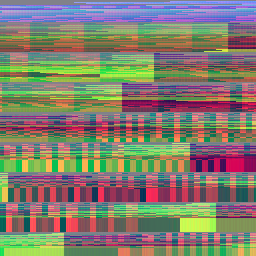
Normals are unit vectors are encoded directly from object space, and so during encoding, we simply remap -1 → 1 into 0 → 1 per channel - and reverse this when decoding in Engine (again, accounting
for potential transformation differences between Blender and the target software).
Why not calculated as an offset like position?
In some cases, it could be adventageous to encode normals as an offset from starting position rather than an absolute object-space vector direction (and may be a future encoding option),
but since the maximum possible range is only (-1 - 1), it decreases
engine-side transformation complexity and reduces compatibility issues to establish encoded normals are to be set as the established object-space normals for the mesh themselves.
RGB-16FLOAT precision is more immediately proven necessicary by analyzing vertex normal encoding:
For VATs using 8-bit formats (e.g. PNG8), this introduces coarse quantization steps of ~1.4°.
16-bit float formats like PNG16FLOAT or RGB16HALF preserve angular precision well below 0.01°, allowing for visually smooth shading and accurate reconstruction.
VATs inherently sample per-vertex, which causes some complexity when using encoded normals on hard edges. To sample hard edges properly, the VAT needs to encode per-vertex normals for every sharp edge. It is not enough to only separate islands in UV space, because each vertex as it exists in the mesh needs a unique value to sample the seam of a hard edge.
OpenVAT provides a method to automatically perform splitting based on edge data. Edge data is recommended to be reviewed before baking with this option enabled.
Ripping all hard edges can add up in vertex count, be sure to understand the implication of using this feature before enabling it on your mesh. For convenience, the encoding info dropdown displays a range of min-max when this is enabled, as it does not properly count all vertices that are ripped by the operation, but can estimate the maximum (if all edges need to be split).
Edge handling only affects vertex normal encoding; it does not affect positional data.
OpenVAT always encodes XYZ > RGB, and assumes content to be exported with Blender's default export orientation of -Z forward, +Y Up. This was done for clarity and consistency of exports - encode once, use in multiple engines - but, requires engine-side transform decoding logic in most cases.
Axis swizzle options are planned as a future improvement, but currently will add a layer of complexity to an already complex topic. It is valid to perform swizzle operations in image manipulation software or custom postprocessing if needed.
Learn more about specific OpenVAT to Engine decoding methods in the engine decoding documentation.
OpenVAT 1.0.4 now allows custom attributes to be encoded to VAT. These values must be per-vertex, float values - usually defined as custom geometry node outputs or via 'store named attribute' node. This allows users to define any animated attribute to be encoded to R, G or B channels (encoding to Alpha is planned but not implemented [v1.0.4]).
A practical example implementation of custom encoding could be absolute world encoding with a pre-defined swizzle for UnrealEngine - here, a user can take Position > (vector math - Multiply by 100) > Separate XYZ > (X channel > Output(name Y), Y channel * -1 > Output(name X), Z > Output(name Z). Set encoding method to "Custom Attributes", scan for attributes, and set R > X, G > Y, B > Z.
Note: Like EXR32 Absolute, the Blender preview of custom attributes will by default affect 'position' of the preview, and will not be accurate, you can modify the geometry node decoding process to simulate your intention for engine decoding or visualize as a color attribute passed to the shader for debugging. (I recommend renaming this geometry node modifier if modifying it so future encoding triggers the an un-modified fresh group to be appended).
OpenVAT includes example integrations for multiple real-time engines. These are intended as templates to help get you started and may require adjustment for your specific production needs. Feel free to contact me with questions or suggestions for better engine workflows.
Unity import tools are currently limited to only accept FBX and PNG outputs - This is slotted to be updated to accept GLB and EXR - but is a current limitation of the system
https://github.com/sharpen3d/openvat-unity.gitTools > OpenVAT..json sidecar) into your Unity Assets folder.Assets/MyObject.animated, define frame range, add custom surface detail, etc.Note: Tangent-Space normal maps may not work properly because of normals deformation via VAT - this is a known limitation of the current system.
Currently supports forward rendering only. A custom Vertex Factory system is in development for next-gen VAT integration- which will allow for better performance and use of deferred renderers. Improved Niagara support is also planned.
Watch the OpenVAT Unreal v1.0.3 Walkthrough on Youtube
OpenVAT-Engine_Tools/Unreal5 from the GitHub repo.Content directory using your system file explorer (not the Unreal editor UI).RGB16 for correct decoding.Note: If lit VATs and shadows appear "sticky" or incorrect, enable forward rendering. Deferred rendering can cause lighting artifacts with vertex-driven meshes. This limitation is planned to be mitigated with future compute shader handling
Godot GLSL templates are available in OpenVAT-Engine_Tools/Godot on GitHub. This does not include a plugin or automatic importer — just manually enter the frame count and value min/max in the provided shader.
Download the latest GLSL implementation here
As an experimental test, OpenVAT includes a compatible VAT shader for TikTok’s Effect House platform. This can be found under OpenVAT-Engine_Tools/EffectHouse and may be helpful for creating animated 3D effects on mobile.
OpenVAT is fully-featured as a viable tool for production, but there are a number of improvements planned for the tool, including engine shader implementation improvement and variation, as well as unmatched encoding flexibility options. Here's my shortlist.
xyz → rga for shader efficiency